
Manual

I....GGGGeeeettttttttiiiinnnnggggSSSSttttaaaarrrrtttteeeedddd
5
Ke
ee
ey
yy
ys
ss
sa
aa
an
nn
nd
dd
dF
FF
Fu
uu
un
nn
nc
cc
ct
tt
t
i
i
i
i
o
o
o
on
nn
ns
ss
s
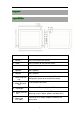
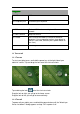
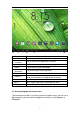
1. Volume -
Press to reduce the volume
2. Volime +
Press to increase the volume
3. “Back”
Press to return to the previous menu
4. Front camera
2Mp front-facing camera
5. Speaker
AAC Speaker
6. Speaker
AAC Speaker
7. Power and lock
key
Hold and press to turn on or turn off this unit.
Briefly press to turn on or turn off the screen.
8. Micro SD-card
slot
To insert Micro SD-cards
9. HDMI port
To connect to TV or display via HDMI cable
10. Micro-USB slot
slot
Connect to a computer via a USB cable to transfer
data (e.g., music, videos, photos, and other files).
11. Power jack
(DC input)
Connect to a 5V output adaptor included in the
accessories