
Manual
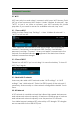


4
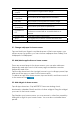
Keys and Functions
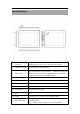
1. Power and
lock key
Hold and press to turn on or turn off the unit.
Briefly press to turn on or turn off the screen.
2. Earphone Jack To connect your earphone
3. Menu key
Tap to view the option menu. When you Tap the
Menu key from within an application, you will see
the sub-menus for the application.
4. Vol+ Key Press to increase the volume
5. Vol- Key Press to decrease the volume
6. Front camera 2M pixel Front camera
7. Home key To go to your home screen
8. TFcard slot To insert your TF card
9. MIC MIC
10. HDMI Connect to TV output via a HDMI cable
11. Mini-USB slot
Connect to a computer via a USB cable to
transfer data
(e.g., music, videos, photos, and other files).