
Instruction Manual




10
operations
f. Volume -
Tap to lower the volume
g. Volume +
Tap to upper the volume
h. WIFI Signal
There will be WIFI signal when WIFI connected
i. Battery status
Show battery status
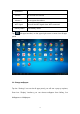
Tap (All Apps launcher) on the upper right corner to enter into all apps
panel:
2.1 Change wallpaper:
Tap the ―Settings‖ icon on the all apps panel, you will see a pop-up options;
Enter into ―Display‖ interface, you can choose wallpaper from Gallery, live
Wallpapers or Wallpapers.