
Owner manual


27
3. Please backup your data before upgrading, the storage will be
formatted when upgrading, data will be lost and unrecoverable.
4. Please do not touch any buttons on the tablets while it is upgrading .
5. Make sure that your tablet is with enough power, you ’ d better charge
the tablet before upgrading, in case of upgrading failure due to low
battery.
6. Please proceed in accordant with the instructions strictly.
9.2
9.2
9.2
9.2 P
P
P
P repar
repar
repar
repar ations
ations
ations
ations work
work
work
work before
before
before
before upgrading
upgrading
upgrading
upgrading
P lease download the “ upgrade tool ” from this PIPO website,
http://www.pipo.cn/En/index.php?m=About&a=gujian_show&id=70
Please download the corresponding firmware from PIPO website,
http://www.pipo.cn/En/index.php?m=About&a=gujian
9.3
9.3
9.3
9.3 H
H
H
H o
o
o
o w
w
w
w to
to
to
to upgrade
upgrade
upgrade
upgrade
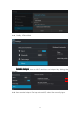
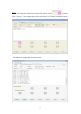
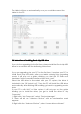
1. Decompress the upgrade tool, double click the “ RK b atch Tool ” icon,
as the bellowing
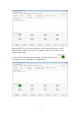
2. Click , choose the firmware downloaded. Then charge your
tablet with power adapt er , and USB cable connects tablet and PC.