
User's Manual

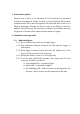



will immediately start blinking when opening the fruit
sensor. Wait for the blinking to stop and the LED to
becomesteady,anindicationthatthesensorhas
connectedtothehubandtheinstallationissuccessful.
3. Receiveddata
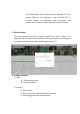
The data received from the sensors reaches the server where it is
analyzed.The analyzed dataprovides users plant statusandirrigation
recommendationsviawebandmobileapps(FigureD).
4. Productfeatures
4.1Hub
● 40sensorsperhub.
● Easyinstallation.
4.2Sensor
● Easymount.
● Highresolutiontrunk/fruitmeasurements.
● Eventtriggeredradiotransmission.
D