
User Guide



116
Chapter 5 Internet Fax
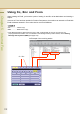
Setting a File Type and a Filename
Documents can be scanned into a PDF or TIFF format, and renamed as well.
z Internet Fax does not support the PDF format. If a document is transmitted to Internet Fax with the PDF format,
the Internet Fax at the receiving station would be unable to print the images, resulting an error.
z The file is automatically named “Image.tif” unless you rename the attached file.
1
Place Original(s).
z Refer to
Placing Originals (Facsimile/Internet
Fax) in the Operating Instructions
(For Basic
Operations) of provided booklet.
2
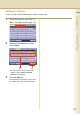
Press the Fax key.
3
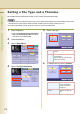
Select “Basic Menu”.
4
Select “File Type and Name”.
5
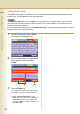
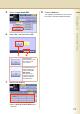
Select a file type.
6
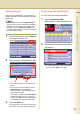
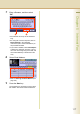
To rename the file, select “Custom”.
TIFF Select to transmit in the TIFF
format.
PDF Select to transmit in the PDF format
(monochrome).
Can be used only if the receiving
station is a computer.
Image Select to transmit by
using the standard
name of image.tif or
image.pdf.
Custom Select to rename the
file.