
User manual


Overview
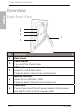
Right Rear View
No. Description
1
Back stand
2
Power button
Turn on/off the PhotoFrame
3
USB port
Allows for a USB flash drive.
Playback photos stored in the inserted drive.
4
Memory card slot
Allows for an SD/SDHC, MMC.
Playback photos stored in the inserted card.
5
Power jack
Connect one end of the AC power adapter into the power
jack and the other end into a power outlet.
1
2
3
4
5
SD/MMC/MS/MS Pro
PHILIPS
EN-4
Philips Digital PhotoFrame
Overview