
User manual


Date & Time page
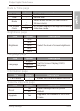
Item Option Description
Date - Set the date.
Time - Set the time.
Mode
-
Select a time format (12-hour clock or
24-hour clock).
On Screen
Clock
On
On screen display of the digit clock during
slideshow mode.
Off
Brightness page
Item Option Description
Brightness
20%
Select the level of screen brightness.
40%
60%
80%
100%
Language page
Item Option Description
Language
English
Set On-Screen Display (OSD)
language.
Spanish
French
Information page
Item Option Description
FW Version - Shows the current firmware version.
Reset & Upgrade page
Item Option Description
Reset
Yes
Revert settings back to system
default.
No
Upgrade Yes
Upgrades the firmware of the Photo
Frame.
Philips Digital PhotoFrame
EN-13
Using Settings