
User manual


Using Smart Energy Saver
The Smart Energy Saver mode provides various pre-defined
power-saving options.
1. In the main menu, scroll to select Smart Energy Saver
and then press OK.
2. Scroll to select a desired option, and then press OK.
For details about the power-saving options, refer to the table below.
Options Description
OFF Turns off Smart Energy Saver.
Save 20% Always saves 20% on backlight power consumption.
Save 50% Always saves 50% on backlight power consumption.
Using Smart Energy Sanver does not affect the photo quality.
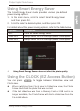
Using the CLOCK (EZ Access Button)
You can press to toggle between Slideshow view and
Clock view.
When switching from Clock view to Slideshow view, the Photo
Frame starts from the photo that was run last.
If the last slideshow was from a Memory Card or USB and is no
longer available, the PhotoFrame will start a slideshow from the
Pre-install album.
Philips Digital PhotoFrame
EN-11
Using Smart Energy Saver