
User manual


Using the Main Menu
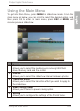
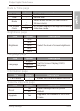
To get into Main Menu, press MENU in slideshow mode. From the
main menu as below, you can scroll to select the desired option, and
then press OK to enter. In main menu, press ESC or MENU will
resume previous slideshow.
# Description
1 Source
Allows you to select the media source among USB flash
drive, Memory card and Pre-install.
2 Interval
Allows you to select the slideshow interval between photos.
3 Transition Effect
Allows you to select the transition effect you wish to apply to
the slideshow.
4 Smart Energy Saver
Allows you to select a power-saving option.
5 Setting
Allows you to configure the settings of the PhotoFrame.
Philips Digital PhotoFrame
EN-9
Using the Main Menu