
User manual


Step 3 Starting Slideshows Automatically
Insert memory card or USB drive to start slideshow automatically. If
there are no content, PhotoFrame will initiate slideshow playback
from preinstalled images.
If there is no operation more than 1 minute during menu or setting
mode, the PhotoFrame will resume previous slideshow
automatically.
Operating the PhotoFrame
You can use the control buttons on the back to operate the Photo
Frame.
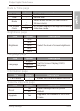
# Icon Description
1 ESC
ESC button (ESCAPE button)
Cancels current operation and/
or returns to the previous
page
2
◀
O
K
▶
Scroll wheel/ OK button
• Press this button to enter or confirm your operation
/selection.
• Scroll this button to the left to select the previous item.
• Scroll this button to the right to select the next item.
3 MENU
MENU button
Displays the pop-up menu.
4
EZ Access Button
Switches between Clock view and Slideshow view
EN-8
Philips Digital PhotoFrame
Getting started