
User guide






5
Funai 31
Hitachi 33
JVC 38
Kenwood 36
LG 37
Onkyo 34
Panasonic 41
Pioneer 40
Samsung 43
Sanyo 32
Sharp 35
Sony 42
Toshiba 39
Vizio 30
Other*
44
Codes for DVD
and Blu-Ray Brands
Aiwa 70
Bose 67
Denon 63
Harman/
Kardon
62
Hitachi 71
LG 65
Onkyo 66
Phillips 69
Pioneer 68
Samsung 64
Sanyo 73
Sharp 72
Sony 60
Yamaha 61
Other*
79
Codes for
Amplifier Brands
Funai 11
Insignia 21
LG 15
Panasonic 13
Philips 19
RCA 20
Samsung 18
Sanyo 12
Sharp 14
Sony 17
Toshiba 16
Vizio 10
Other*
29
Codes for
TV Brand
Your remote control
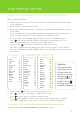
Quick tip
To change the input
selection on your TV,
rst check that your
remote is in TV mode
by pressing until
the light ashes red
beside TV. Press
to change your input
(ex HDMI1, HDMI2 etc).
Programming instructions for your TV and/or additional device
Before getting started:
n Stand 6-8 feet away from the TV and ensure there is a line of sight between the remote
and the digital box.
n Make sure the TV and digital box are on.
n Make sure the digital box volume is set to 25 by using the remote volume button while in
OPTIK mode.
1 Turn on the device that you would like to program the remote for. This could be your TV
set, or an auxiliary device such as an amplifier, DVD or Blue-Ray player.
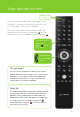
2 There are 3 lights on the remote: green for OPTIK, red for TV and yellow for AUX.
Press
until the device of your choice is illuminated on your remote. Use TV to
program the remote for your TV set or AUX for all other devices.
3 Press and hold until the red TV or yellow AUX light flashes twice.
4 From the lists below, enter the code for your device brand and the TV or AUX light will
flash twice. Entering the code for "Other" will search for all other brands and may take up
to 15 minutes.
5 Press and hold
until your TV or auxiliary device turns off.
6 Press and the red TV or yellow AUX light will flash twice.
7 Press
to switch your TV or auxiliary device back on.
8 Press until the green OPTIK light is on. Once in OPTIK mode, you can control
your Optik TV digital box as well as your TV and auxiliary device simultaneously.
You’re done! To program another device repeat the above steps.
Need help? Go to telus.com/optikremote for troubleshooting steps.