
User guide






4
Can’t find what you are looking for? Visit telus.com/tvhelp for more Optik TV help info.
4
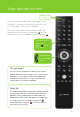
MODE
Allows your remote to control your digital box, TV or additional (aux)
device. Press to select Optik (green), TV (red), or Aux (yellow).
POWER
Turns devices on and off
INPUT
Displays TV or video input sources. Input button can be activated by
holding down the search button.
ON DEMAND
Displays the On Demand menu
MENU
Displays the main menu
BACK / EXIT
Tap to go back to the previous screen or press and hold to exit.
APPS
Optik TV apps
MOVE
SELECTION
Navigate up, down, left or right
OK
Selects the highlighted item
INFO
Displays a description of the selected program
SEARCH
Display the search menu
GUIDE
Displays the Interactive Programming Guide
VOL + / VOL –
Increases/decreases volume
CH/PG + /
CH/PG -
Displays the program listings and menus one page at a time
MUTE
Turns sound on and off from indicated source
PREV
Returns to the previous channel and shows picture-in-picture of the last
5 channels you viewed
DELETE
Deletes entry. Delete button can be activated by holding down the
options button.
OPTIONS
Displays the current screen’s shortcuts
RECORD
Records live TV
REW/FF
Reverses or fast-forwards. Repeatedly press the button to choose from
3 speeds. Also, when the guide is open, use the forward button to skip
the guide forward 24 hours.
STOP
Stops your On Demand movie, VCR/DVD, or recorded program
PAUSE
Pauses your On Demand movie, VCR/DVD, live TV or recorded program
PLAY
Plays your On Demand movie, VCR/DVD, paused live TV or recorded
program
REPLAY/SKIP
Reverses in 7-second intervals or fast-forwards in 30-second intervals
for On Demand movies, live TV and recorded programs
RECORDED TV
Displays recorded programs and scheduled recordings
The following buttons also allow you to access additional functions if you have a PVR: