
User guide






3
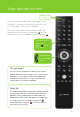
Your remote control
Why have multiple remotes when all you need is one?
The Optik TV remote is universal and works with most
TVs, DVD players, VCRs and A/V receivers.
Once you have programmed your remote, select the
device you want to power on by pressing until the
device of your choice is selected, and then pressing .
Did you know?
You can use your smartphone or tablet as your remote?
With the Optik Smart Remote app you can control your TV,
browse the onscreen guide and On Demand library and
record shows while you’re on the go. To find out more,
skip to page 13 or visit telus.com/apps.
Mode & Power
Buttons
Quick tip
Your Optik TV digital box is Energy Star certified and enters
energy saving mode after 4 hours of inactivity. When the
digital box enters standby mode, the video outputs are
disabled and a black screen will appear. If your digital box
is on and you want to exit standby mode, press
.
If your digital box is off, press
to turn it on and this
will resume your TV service.
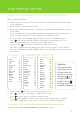
To change your TV
input source,
press
while
in TV mode.
Tap to go back.
Press and hold
to exit.