
User guide






22
Can’t find what you are looking for? Visit telus.com/tvhelp for more Optik TV help info.
22
Using your Optik TV PVR
PVR Anywhere
With Optik TV’s PVR, one PVR is all you need to get full PVR functionality on any digital
box in your home. You can pause a recorded show you have been watching in your living
room and pick up where you left off in the kitchen or den. You can also schedule and
access recordings from any room in your home, and even watch the same recording
from different rooms at the same time and control them separately. Plus pause, rewind
and fast-forward live TV from any TV with a digital box.
Resuming a recorded program on a different TV
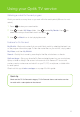
1
Press on the recorded show you are watching.
2 Go to another TV and turn on the digital box.
3 Press .
4 Use to select the same show and press .
5 Select Resume play and press to start viewing
the recording from where you left off.
Controlling live TV
When you’re watching a show, your PVR will save it for up to 90 minutes, so you can
pause, rewind and fast-forward whenever you like on the
TV
connected to your PVR.
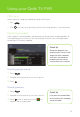
Once you’ve paused live
TV
, a status bar will show you where you are in the program and
how much has been temporarily saved.
If you pause for longer than 90 minutes, the program will automatically start playing from
the point where you paused it. All temporarily saved live
TV
will be deleted once you
change the channel or turn your
TV
off. Remember, if you’d like to save a show, be sure
to record it.
The bright green cursor
indicates where you are
within the saved program.
The shaded green
segment indicates
saved program.
When the cursor is at the
far right of the green shaded
segment, you are at the
current time in the program.
Quick tip
Your Optik TV PVR
allows you to watch
the next episode and
delete the one you
just watched.