
User guide






20
Can’t find what you are looking for? Visit telus.com/tvhelp for more Optik TV help info.
20
On Demand
With On Demand you can order great films and enjoy full control to start, pause, rewind
and fast-forward. Choose from hundreds of titles, including Hollywood blockbusters,
timeless classics and a wide variety of titles available in HD. Plus check out TV
On Demand to watch great shows and movies when it’s convenient for you. To find out
what’s playing, check out the On Demand menu. Great new releases updated regularly.
If you want to prevent unauthorized rentals, create a rental locking PIN. Refer to page 8
to learn how.
Check out the TV On Demand category. TV On Demand shows and movies are free to
watch with a subscription to the channel.
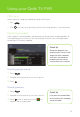
Renting an On Demand program
1
Press .
2 Use to select a category in the main menu. Use to browse a
desired category.
3 Use to browse titles. Press
to select the title. A Program Summary
screen will appear for you to rent the
video, watch a preview, or add to
my wishlist.
4 Select Rent, and press .
5 Navigate to Rent for $ and press
to confirm rental. The video will begin
playing immediately.
You will see the charge for your purchase on your next TELUS bill. If you watched a TV
On Demand title there will be no charge for viewing.
If you have blocked adult-rated content, the titles of the adult films will not appear in the
On Demand menu within the adult category. To view these titles refer to page 8 to
learn how to disable your Parental Controls.