
User guide



15
Using your Optik TV service
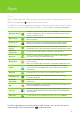
On Demand
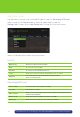
On Demand Lists all videos by category
Rentals View your current rentals, your wish list and rental history
Search Allows you to easily find your favourite On Demand titles
TV apps
TV apps
Access all the apps Optik TV has to offer. To find out more about the apps check
out page 13
Settings
General
Allows you to turn system sound effects on or off, access system information
and troubleshoot your connection
Television
Allows you to customize your guide, favourites list, screen aspect ratio and
closed captioning
Audio
Allows you to activate descriptive video and change your digital audio
output settings
Parental Controls
Allows you to block On Demand titles, PPV events and programs by channel,
rating or content
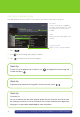
Guide Find out which shows are on and which ones are coming up
Optik TV Account
Create an Optik TV account to use apps like Galaxie, Optik Smart Remote and
Optik on the go
Help Centre
Help Centre
Access Optik tutorials On Demand to learn more about how to get the most
out of your Optik services