
User guide



14
Can’t find what you are looking for? Visit telus.com/tvhelp for more Optik TV help info.
14
Using your Optik TV service
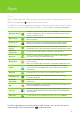
Using the menu
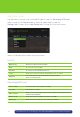
Use the menu to quickly access the Live TV (refer to page 14), Recordings (PVR only)
(refer to page 14), On Demand (refer to page 15), Apps (refer to page 15),
Settings (refer to page 15) and Help Centre (refer to page 15), drop down menus.
Here is a brief description of each drop down menu:
Live TV
Watch live TV Allows you to watch a live TV program
Guide Accesses the onscreen guide
Favourites Accesses your customized favourites list
Search Allows you to search for a movie, TV program, person or channel
Categories
Lists channels that are grouped together by subject matter,
genre or content provider
Recordings (PVR only)
View recordings Lists all in progress and completed recordings
Scheduled Lists all future recordings
Add a recording
Allows you to record a program using search, the guide or by entering the channel
number and recording time
Remote record Set up your remote recording account and access FAQ’s
PVR storage Shows how much storage space is remaining on your PVR