
Installation guide


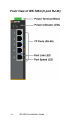


IDS-105G Installation Guide - 7 -
Bottom view of the IDS-105G (with fiber
port)
Top view of the IDS-105G
Power
The IDS-105G switch has two power inputs that can be connected
simultaneously to DC or AC power sources. See Top view of the
IDS-105G for location. If one power source fails, the other acts as
a backup, and automatically powers the switch. See Connecting
Power to the IDS-105G for information on how to connect power.
Reset Button
To reset the IDS-105G insert a paper clip into the air hole vent
(see Top view of the IDS-105G for location) and gently press the
reset button. The LEDs on the IDS-108F will go On and then
momentarily Off when released to show that the unit has been
reset. All links will be dropped and the MAC tables will be cleared.