
X-5 Bridge Camera Manual




161
5
Editing and Printing Images
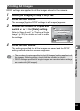
DPOF settings are applied to all the images stored in the camera.
1
Select [All Images] in Step 3 on p.160.
2
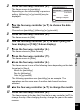
Press the 4 button.
The message [Applies DPOF settings to all images] appears.
3
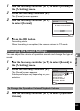
Choose the number of copies and
switch O or P for [Date] setting.
Refer to Steps 6 and 7 in “Printing a Single
Image” (p.160) for details on how to make
the settings.
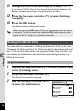
4
Press the 4 button.
The settings specified for all the images are saved and the DPOF
setting method selection screen reappears.
Printing All Images
• The number of copies specified in the [All Images] setting applies to all
the images. Before printing, check that the number is correct.
• DPOF settings specified for single images are canceled when settings
are made with [All Images].
Copies
A p pl i e s D P O F s e t t in gs
t o a l l im a g e s
Applies DPOF settings
to all images
Date
D a te
Date
C a nc e l
Cancel
OK
O K
OK
MENU
01