
Operation Manual





248
9
Appendix
3
Press the 4 button.
All the logs are deleted and the camera returns to capture mode.
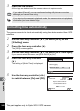
The camera corrects its clock automatically using time data received from GPS
satellites.
1
Use the four-way controller (23) to select [GPS] on the
[WSetting] menu.
2
Press the four-way controller (5).
The [GPS] screen appears.
3
Use the four-way controller (23) to select [GPS Time Sync].
If you cannot select this menu, set [GPS On/Off] to [On].
4
Press the four-way controller
(5).
The setting of [World Time] is displayed.
5
Use the four-way controller (45)
to switch between [On] and [Off].
If you select [Cancel], you can continue shooting still pictures or movies
although you cannot save a log.
If you start up the camera in playback mode, the camera returns to playback
mode after you have deleted logs.
Correcting time automatically
GPS On/Off
GPS Logging
GPS Time Sync Off
On
MENU
GPS
Time Dif.
OK
Cancel
Destination
New York
Syncs camera time to
current GPS location
02/02/2012
01:25
+5:00
Off
OK
MENU
DST
OFF
OFF
OFF
This part applies only to Optio WG-2 GPS camera