
Operation Manual




247
9
Appendix
3
Use the four-way controller (23)
to select [GPS Logging].
4
Press the four-way controller (5).
The [GPS Logging] screen appears.
5
Use the four-way controller (23) to select [Discard log data],
and press the 4 button.
A confirmation screen appears.
6
Use the four-way controller (23)
to select [Discard].
7
Press the 4 button.
If 999 log files are saved, the camera cannot save a log file anymore. Insert a new
SD Memory Card or delete logs according to the following procedures to save
new ones.
1
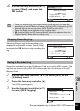
Turn the camera on.
[Max # of logs already saved. Delete all existing logs and save current log as
new?] message is displayed.
2
Use the four-way controller (23)
to select [Delete All].
Deleting logs
GPS On/Off
GPS Logging
GPS Time Sync Off
On
MENU
GPS
OK
Cancel
OK
OK
OK
Discard
Discards log data
without saving it
OKOKOK
OKOKOK
Max # of logs already saved.Max # of logs already saved.
Delete all existing logs andDelete all existing logs and
save current log as new?save current log as new?
Delete All
Cancel
Max # of logs already saved.
Delete all existing logs and
save current log as new?
This part applies only to Optio WG-2 GPS camera