
Operation Manual




95
3
Taking Pictures
1
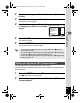
Press the 3 button in A mode.
The [A Rec.Mode] menu appears.
2
Use the four-way controller (23) to select [Movie].
3
Press the four-way controller (5).
The [Movie] screen appears.
4
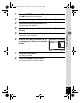
Use the four-way controller (23) to select [Recorded
Pixels].
5
Press the four-way controller (5).
A pull-down menu appears.
6
Use the four-way controller (23)
to change the number of recorded
pixels.
7
Press the 4 button.
The setting is saved.
8
Press the 3 button twice.
The camera returns to capture status.
Rec. Time
MENU
ขᶖ
ขᶖ
Cancel
OK
OK
15:02:26
Recorded Pixels
Movie SR
640
15
15
640
24
24
320
24
24
320
15
15
1280
15
15
e_kb496.book Page 95 Wednesday, July 15, 2009 10:23 AM