
Operation Manual




91
3
Taking Pictures
4
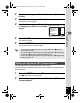
Use the four-way controller (23)
to change the sensitivity.
5
Press the 4 button.
The setting is saved.
6
Press the 3 button.
The camera returns to capture status.
You can choose whether to imprint the date and/or time when taking still
pictures.
1
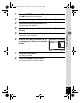
Press the 3 button in A mode.
The [A Rec.Mode] appears.
2
Use the four-way controller (23) to select [Date
Imprint].
3
Press the four-way controller (5).
A pull-down menu appears.
• When Sensitivity is set to 3200 or 6400, the number of recorded pixels
is fixed at f.
• When set to 9 (Green) or C (Movie) mode, only Auto (sensitivity 100
- 800) is available.
• When set to c (Digital SR) mode, only Auto (sensitivity 100 - 6400)
is available.
Saving the sensitivity setting 1p.97
Setting the Date Imprint Function
R e c . Mode
OK
OK
MENU
Cancel
1 / 2
800
4 00
200
100
Auto
R e corde d P ixels
F ocusi ng Ar e a
S e nsi t i v i ty
M ovie
E V Compe nsati on
D i g i tal Zoom
e_kb496.book Page 91 Wednesday, July 15, 2009 10:23 AM