
Operation Manual




89
3
Taking Pictures
2
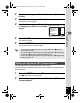
Use the four-way controller (23) to select [Recorded
Pixels].
3
Press the four-way controller (5).
A pull-down menu appears.
4
Use the four-way controller (23)
to change the number of recorded
pixels.
5
Press the 4 button.
The setting is saved.
6
Press the 3 button.
The camera returns to capture status.
You can adjust the overall brightness of the picture.
Use this function to take pictures that are intentionally overexposed or
underexposed.
1
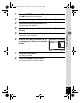
Press the 3 button in A mode.
The [A Rec.Mode] menu appears.
2
Use the four-way controller (23) to select [EV
Compensation].
• The number of recorded pixels for images captured in 9 (Green)
mode is fixed at N.
• The number of recorded pixels for images captured in C (Half-length
Portrait) or J (Frame Composite) is fixed at h.
• The number of recorded pixels for images captured in c (Digital SR)
mode is fixed at f.
Setting the Exposure (EV Compensation)
Recordable Image No.
MENU
Cancel
OK
OK
12
10
M
7
M
5
M
3
M
Recorded Pixels
Focusing Area
Sensitivity
Movie
EV Compensation
Digital Zoom
10
M
e_kb496.book Page 89 Wednesday, July 15, 2009 10:23 AM