
Operation Manual



73
3
Taking Pictures
2
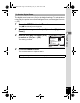
Use the four-way controller (2345) to select R.
3
Press the 4 button.
The R (Kids) mode is selected and the
camera returns to capture status.
When the camera recognizes a face, the
Face Recognition function is activated and
the face recognition frame appears (p.61).
4
Press the shutter release button halfway.
The focus frame on the display turns green when the camera focuses
on the subject at the correct distance.
5
Press the shutter release button fully.
The picture is taken.
Use this mode to keep your moving pet in focus while you take the
picture and capture the color of your pet’s coat. Choose the appropriate
icon depending on what color your pet is (closer to black or white or in
between).
1
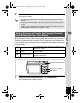
Press the four-way controller (3) in A mode.
The Capture Mode Palette appears.
2
Use the four-way controller (2345) to select Y.
3
Press the 4 button.
The Pet mode selection screen appears.
Taking Pictures of Your Pet (Pet Mode)
38
3 8
38
14:25
1 4 : 2 5
14:25
0 2 / 0 2 / 2 0 0 9
02/02/2009
Shutter release button
Four-way controller
4 button
e_kb496.book Page 73 Wednesday, July 15, 2009 10:23 AM