
Operation Manual






54
2
Common Operations
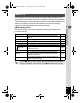
[W Setting] Menu
Item Description Page
Sound
For adjusting the operation volume and playback
volume, and setting the start-up sound, shutter sound,
key operation sound and self-timer sound
p.139
Date Adjustment For adjusting the date and time p.140
World Time For setting the Hometown and Destination p.143
Language/
For setting the language in which menus and
messages appear
p.145
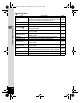
Folder Name
For choosing how names are assigned to folders for
storing images
p.146
USB Connection
For setting the method for connecting to a computer
(MSC or PTP).
p.147
Video Out For setting the output format to the AV equipment p.149
Brightness Level For changing the brightness of the display p.150
Power Saving
For setting the time until the camera enters power-
saving mode
p.150
Auto Power Off
For setting the time until the camera turns off
automatically
p.151
Reset
For returning settings other than the date and time,
language, world time and video out to their defaults
p.153
Delete all For deleting all images at once. p.152
Format For formatting the SD Memory Card p.138
e_kb496.book Page 54 Wednesday, July 15, 2009 10:23 AM