
Operation Manual




19
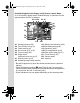
Normal Display in Still Picture Capture Mode
* 3 and 4 appear only when the shutter release button is pressed halfway.
* As to 7, when the focus mode is set to = and the Auto-Macro function
is activated, the q appears on the display (p.86).
* Some indications may not appear depending on the shooting mode.
1 Shooting mode (p.59) 9 Memory status (p.35)
2 Face Priority icon (p.61) 10 Remaining image storage capacity
3 Shutter speed 11 Battery level indicator (p.29)
4 Aperture 12 Focus frame (p.56)
5 Flash mode (p.84) 13 Date and time (p.41)
6 Drive mode (p.78, p.79) 14 EV compensation (p.89)
7 Focus mode (p.86) 15 Date Imprint setting (p.91)
8 Digital zoom/Intelligent zoom
icon (p.67)
16 World time setting (p.143)
14:25
1 4 :2 5
14:25+1.0
+ 1 .0
+1.0
38
3 8
38
0 2 /0 2/ 20 09
02/02/2009
F3.5
F 3 .5
F3.5
1/250
1 / 25 0
1/250
13
161514
1
8
7
10
11
12
9
3
4
65
2
e_kb496.book Page 19 Wednesday, July 15, 2009 10:23 AM