
Operation Manual






148
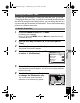
6
Settings
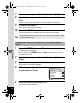
4
Use the four-way controller (23)
to select [MSC] or [PTP].
5
Press the 4 button.
The setting is saved.
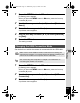
MSC (Mass Storage Class)
A general-purpose driver program that handles devices connected to the
computer via USB as a memory device. Also indicates a standard for
controlling USB devices with this driver.
By simply connecting a device that supports USB Mass Storage Class,
you can copy, read, and write files from a computer without installing a
dedicated driver.
PTP (Picture Transfer Protocol)
A protocol that allows transfer of digital images and control of digital
cameras via USB, standardized as ISO 15740.
You can transfer image data between devices that support PTP without
installing a device driver.
Unless otherwise specified, select MSC when connecting the Optio E80
to your computer.
MSC (Mass Storage Class) and PTP (Picture Transfer Protocol)
S ettin g
F o l d e r Name
Sou nd
D a te Ad jus t m e n t
Worl d Tim e
1 / 3
MENU
Cancel
OK
OK
M SC
P T P
USB
Conne c tion
02/ 02/ 2009
E n glis h
e_kb496.book Page 148 Wednesday, July 15, 2009 10:23 AM