
Operation Manual






141
6
Settings
4
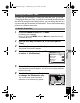
Press the four-way controller (5).
The frame moves to [mm/dd/yy].
Depending on the initial setting or previous
setting, [dd/mm/yy] or [yy/mm/dd] may be
displayed.
5
Use the four-way controller (23)
to choose the date and time
display style.
Choose from [mm/dd/yy], [dd/mm/yy] or
[yy/mm/dd].
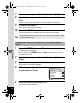
6
Press the four-way controller (5).
The frame moves to [24h].
7
Use the four-way controller (23)
to select [24h] (24-hour display) or
[12h] (12-hour display).
8
Press the four-way controller (5).
The frame returns to [Date Format].
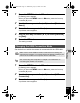
9
Press the four-way controller (3).
The frame moves to [Date].
D a te Ad jus t m e n t
MENU
Cancel
D a te Format
D a te
Tim e
S ettin g s complete
mm dd yy
01/ 01/ 2009
00: 00
//
24h
MENU
D a te Ad jus t m e n t
Cancel
D a te Format
D a te
Tim e
S ettin g s complete
mm dd yy
01/ 01/ 2009
00: 00
// 24h
MENUMENU
D a te Ad jus t m e n t
Cancel
D a te Format
D a te
Tim e
S ettin g s complete
01/ 01/ 2009
00: 00
mm dd yy//
24h
e_kb496.book Page 141 Wednesday, July 15, 2009 10:23 AM