
Q7 Digital Camera Manual


Table Of Contents
- Checking the Contents of the Package
- How to Use This Manual
- Contents
- Introducing the PENTAX Q7
- Getting Started
- Taking Pictures
- Playback Functions
- Changing the Settings
- Appendix
4
Playback
55
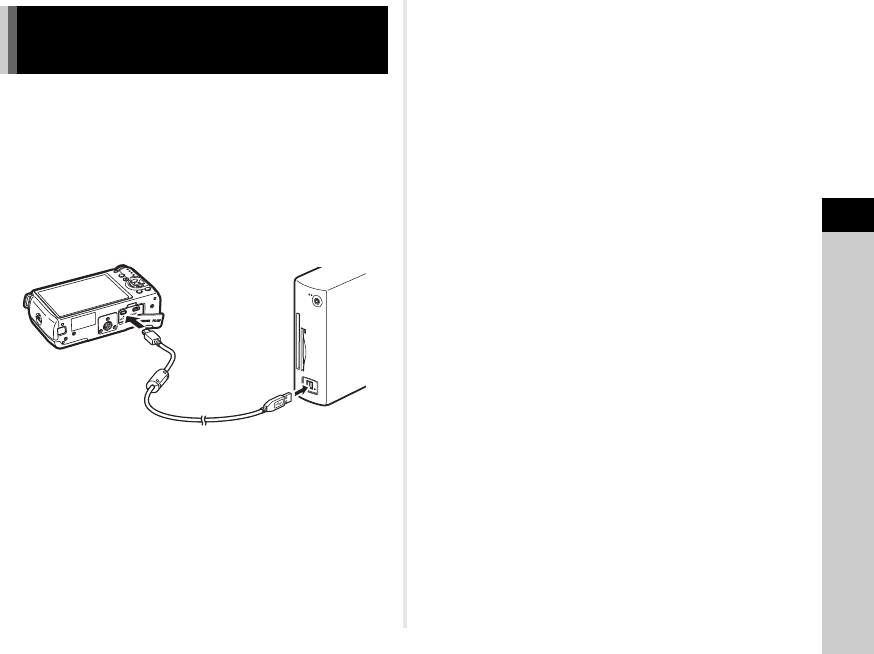
Connect the camera to a computer using the provided USB
cable I-USB7.
1 Turn the computer on.
2 Turn the camera off.
3 Open the terminal cover of the camera, and
connect the USB cable to the PC/AV terminal.
4 Connect the USB cable to the USB port of the
computer.
5 Turn the camera on.
The camera is recognized as a removable disk.
If the “Q7” dialog appears when the camera is turned on,
select [Open folder to view files using Windows Explorer]
and click the OK button.
6 Save the captured images to the computer.
7 Disconnect the camera from the computer.
uCaution
• The camera cannot be operated while it is connected to a
computer. To operate the camera, terminate the USB
connection on the computer, then turn off the camera and
remove the USB cable.
tMemo
• Refer to p.83 for system requirements to connect the camera
to a computer or to use the software.
Connecting the Camera to a
Computer