
user manual



150
5
Editing and Printing Images
5
When the printer is ready to print,
turn the camera on.
The printing mode selection screen
appears.
Go to the following pages.
• “Printing Single Images” (p.150)
• “Printing All Images” (p.152)
• “Printing Using the DPOF Settings” (p.153)
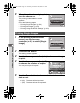
1
In the printing mode selection
screen, use the four-way
controller (23) to select [Single
Image].
2
Press the 4 button.
The setting screen appears.
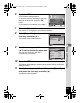
3
Use the four-way controller (45) to choose an image
to print.
4
Use the four-way controller (23)
to choose the number of copies.
You can print up to 99 copies.
5
Use the Green button to choose whether to insert the
date or not.
O(On) The date will be imprinted.
P (Off) The date will not be imprinted.
Printing Single Images
Single Image
S e l e c t p r in t i n g mo d e
Select printing mode
OK
OK
O K
OK
All Images
DPOF AUTOPRINT
Single Image
S e l e c t p r in t i n g mo d e
Select printing mode
All Images
DPOF AUTOPRINT
OK
OK
O K
OK
Copies
P r i n t t h i s i m a g e
Pri nt thi s image
OK
Print
Print
Date
01
MENU
D a t e
Date
100
1 0 0
-
0017
0 0 1 7
100
-
0017
Cancel
C a n c e l
Cancel
e_kb477.book Page 150 Thursday, November 20, 2008 4:21 PM