
user manual


Table Of Contents
- For Using Your Camera Safely
- Care to be Taken During Handling
- Contents
- Composition of the Operating Manual
- 1 Before Using Your Camera
- 2 Getting Started
- 3 Basic Operations
- 4 Shooting Functions
- 5 Shooting Settings
- 6 Playback Functions and Image Editing
- 7 Changing Additional Settings
- 8 Connecting to a Computer
- 9 Using the Flash
- 10 Appendix
134
Shooting Functions
4
Takes still pictures at a set interval from a set time and saves them as a
single movie file (Motion JPEG, file extension: .AVI).
The following items can be set.
1
Select [Interval Movie] in the [C Movie 1] menu, and press
the four-way controller (5).
The [Interval Movie] screen appears.
2
Use the four-way controller (23) to select [Interval], and
press the four-way controller (5).
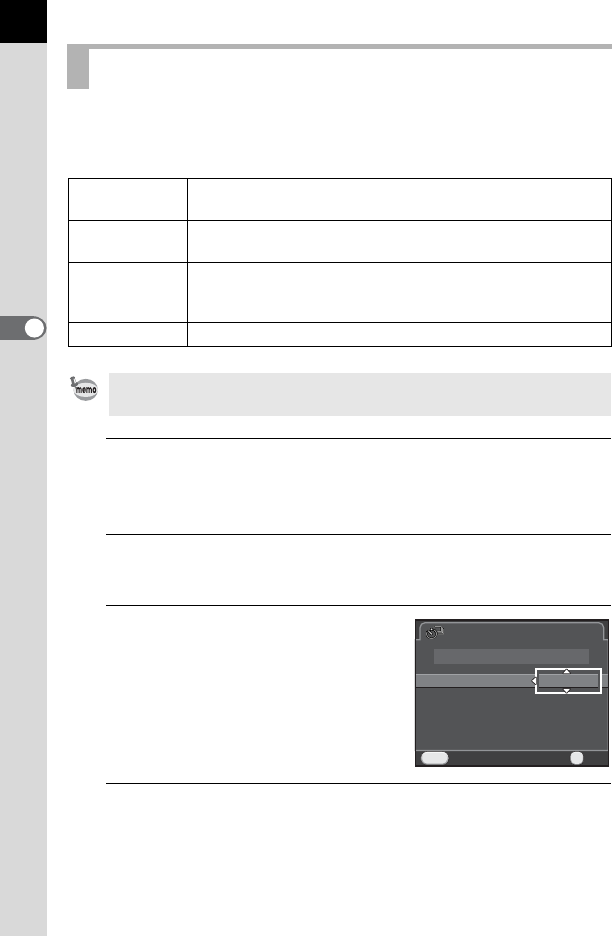
3
Use the four-way controller (23)
to select the shooting interval,
and press the 4 button.
4
Use the four-way controller (23) to select [Recording
Time], and press the four-way controller (
5
).
Interval Movie
Interval
Select from 3 sec., 5 sec., 10 sec., 30 sec., 1 min., 5 min., 10
min., 30 min., or 1 hour.
Recording Time
Set the duration of recording from 12 seconds to 99 hours. The
time that can be set varies depending on the [Interval] setting.
Start Interval
Select whether to take the first picture now or at a set time.
Selecting [Now] starts shooting immediately. When [Set Time]
is selected, set [Start Time].
Start Time Set the time at which to start shooting.
Interval Movie is available only when the mode dial is set to C.
CancelCancel
MENU
Interval MovieInterval Movie
3sec.3sec.
NowNow
Start shootingStart shooting
OKOK
OK
IntervalInterval
Recording TimeRecording Time 00:00'12"00:00'12"
Start IntervalStart Interval
Start TimeStart Time