
K-50 Digital Camera Manual


Table Of Contents
- For Using Your Camera Safely
- Care to be Taken During Handling
- Contents
- Composition of the Operating Manual
- 1 Before Using Your Camera
- 2 Getting Started
- 3 Basic Operations
- 4 Shooting Functions
- 5 Shooting Settings
- 6 Playback Functions and Image Editing
- 7 Changing Additional Settings
- 8 Connecting to a Computer
- 9 Using the Flash
- 10 Appendix
56
Getting Started
2
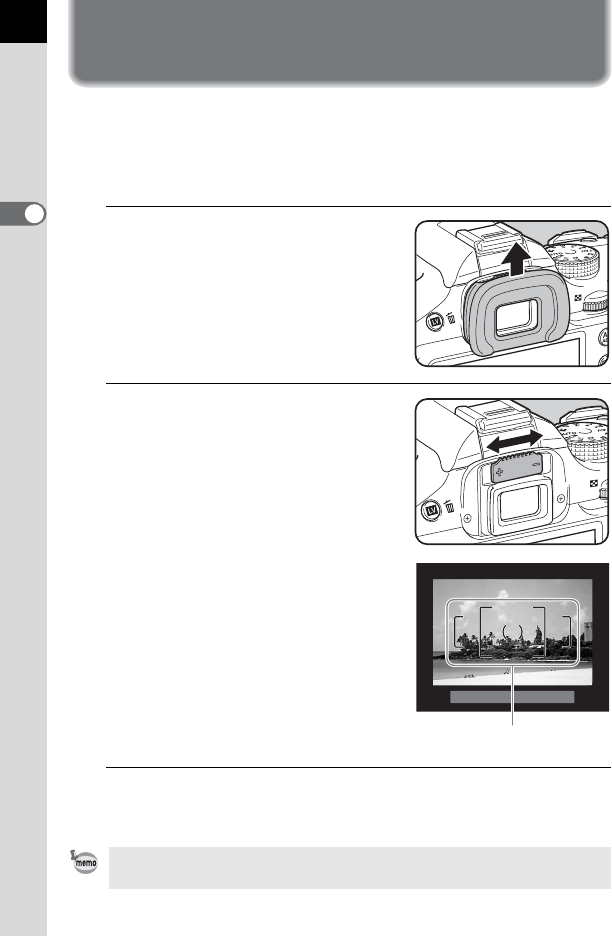
Adjusting the Viewfinder Diopter
You can adjust the viewfinder diopter to suit your eyesight.
The Eyecup FR is attached to the viewfinder portion when the camera
leaves the factory. The diopter can be adjusted with the eyecup attached.
However, adjustment is easier with the eyecup removed.
1
Remove the eyecup by pulling it
out in the direction of the arrow.
2
Look through the viewfinder, and
slide the diopter adjustment lever
left or right.
Adjust the lever until the AF frame in the
viewfinder is focused.
Point the camera at a white wall or other
bright and consistent surface.
3
Align the eyecup with the groove on the viewfinder
eyepiece and push it into the position.
You can also use the optional Magnifier Eyecup O-ME53 for more precise
focusing.
AF frame