
K-50 Digital Camera Manual


Table Of Contents
- For Using Your Camera Safely
- Care to be Taken During Handling
- Contents
- Composition of the Operating Manual
- 1 Before Using Your Camera
- 2 Getting Started
- 3 Basic Operations
- 4 Shooting Functions
- 5 Shooting Settings
- 6 Playback Functions and Image Editing
- 7 Changing Additional Settings
- 8 Connecting to a Computer
- 9 Using the Flash
- 10 Appendix
50
Getting Started
2
We recommend the use of the optional AC adapter kit K-AC128 when
using the monitor for a long time or when connecting the camera to a
computer or AV device.
1
Make sure that the camera is turned off.
2
Open the battery cover.
Refer to Step 1 on p.47.
Remove the battery if it is inserted in the camera.
3
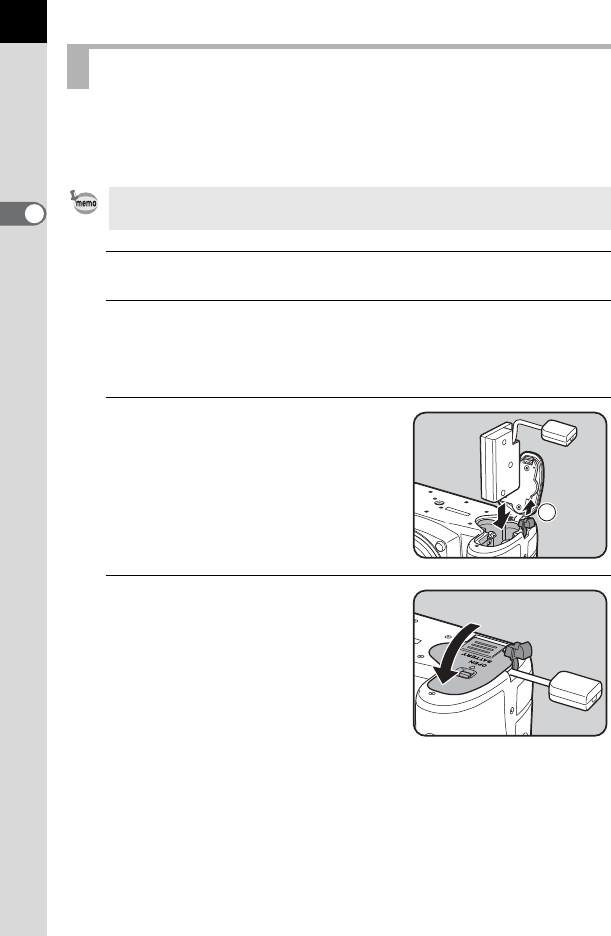
Pull out the connection cable
cover (1) on the right of the
battery cover, and insert the DC
coupler into the battery chamber
until it locks into place.
4
Close the battery cover.
The connection cable is pulled out from
the connection cable cover section.
Using the AC Adapter
The AC Adapter Kit K-AC128 includes AC Adapter D-AC120, DC Coupler
D-DC128, and AC plug cord.
1