
K-50 Digital Camera Manual


Table Of Contents
- For Using Your Camera Safely
- Care to be Taken During Handling
- Contents
- Composition of the Operating Manual
- 1 Before Using Your Camera
- 2 Getting Started
- 3 Basic Operations
- 4 Shooting Functions
- 5 Shooting Settings
- 6 Playback Functions and Image Editing
- 7 Changing Additional Settings
- 8 Connecting to a Computer
- 9 Using the Flash
- 10 Appendix
111
Shooting Functions
4
1
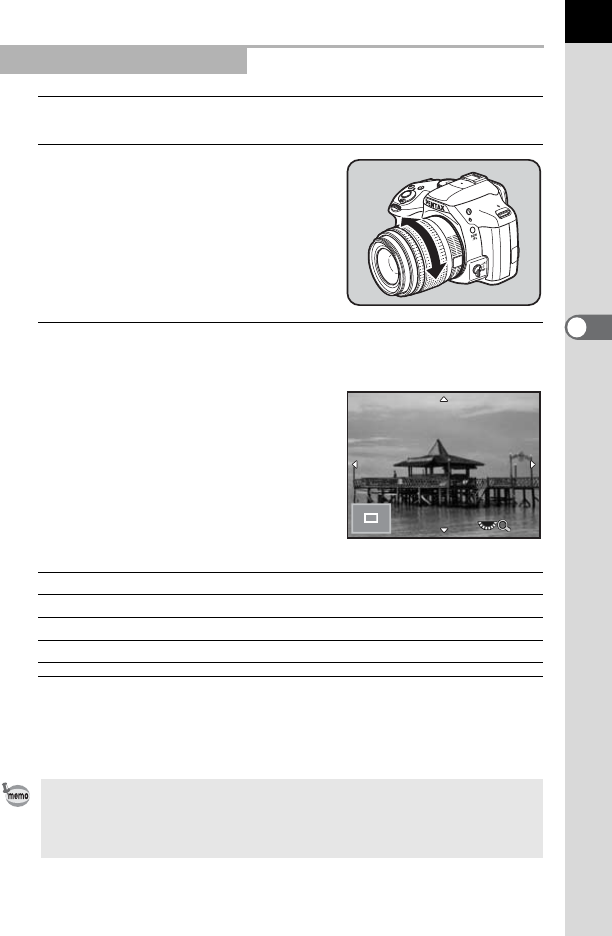
Set the focus mode switch to \.
2
While viewing the monitor, turn
the focusing ring.
3
When it is difficult to check the focus, press the 4
button.
The image on the monitor is magnified.
Available operations
4
Press the 4 button or the shutter release button
halfway.
The camera is ready to take a picture.
Focusing Using Live View
Rear e-dial (S) to the right (y) Magnifies the image (up to 6 times)
Rear e-dial (S) to the left (f) Reduces the image (up to 2 times)
Four-way controller (2345) Changes the display area.
d button Changes the display area to the center.
When [Focus Peaking] is enabled in [Live View] of the [A Rec. Mode 4] menu,
the outline of the subject in focus is emphasized and makes it easier to check
the focus. If you switch to = mode after enabling Focus Peaking in \ mode,
Focus Peaking also works in = mode.
x4x4