
K-50 Digital Camera Manual


Table Of Contents
- For Using Your Camera Safely
- Care to be Taken During Handling
- Contents
- Composition of the Operating Manual
- 1 Before Using Your Camera
- 2 Getting Started
- 3 Basic Operations
- 4 Shooting Functions
- 5 Shooting Settings
- 6 Playback Functions and Image Editing
- 7 Changing Additional Settings
- 8 Connecting to a Computer
- 9 Using the Flash
- 10 Appendix
98
Shooting Functions
4
When shooting with a digital camera, image noise (image roughness or
unevenness) becomes noticeable in the following situations.
• when shooting with a high sensitivity setting
• when shooting with long exposures
• when the temperature of the CMOS sensor is high
You can reduce image noise by using Noise Reduction.
Reduces noise at high ISO sensitivity settings.
1
Select [High-ISO NR] in the [A Rec. Mode 3] menu, and
press the four-way controller (5).
The [High-ISO NR] screen appears.
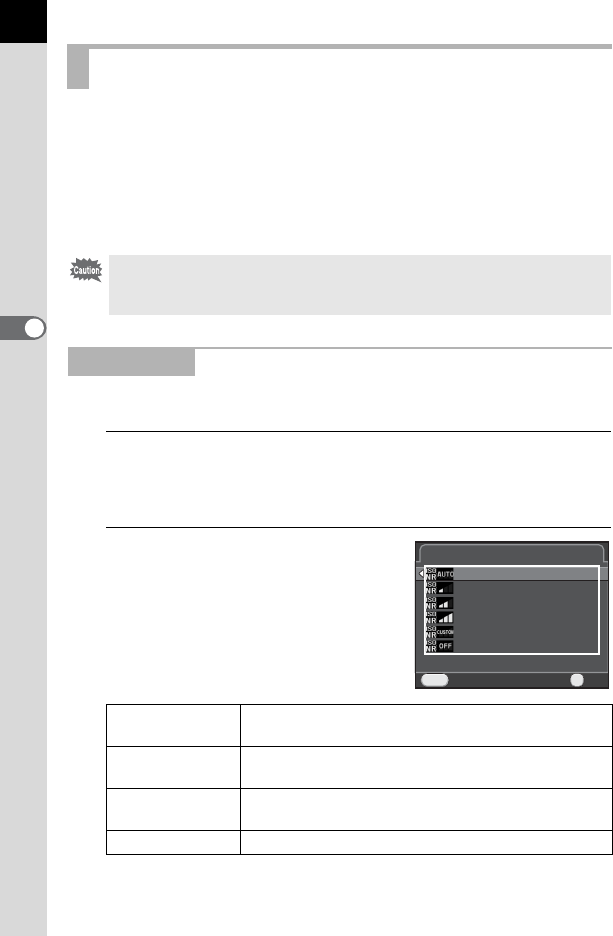
2
Press the four-way controller
(5), and use the four-way
controller (23) to select a
setting.
Reducing the Image Noise (Noise Reduction)
Pictures cannot be taken while the camera is performing a noise reduction
process. In particular, if you use [Slow Shutter Speed NR], it may take more
time to process.
High-ISO NR
Auto
Applies Noise Reduction at optimally calculated levels
throughout ISO range. (default setting)
Low/Medium/High
Applies Noise Reduction at constant chosen level
throughout ISO range.
Custom
Applies Noise Reduction at user-defined levels for
each ISO setting.
Off Does not apply Noise Reduction at any ISO setting.
CancelCancel
MENU
High-ISO NRHigh-ISO NR
AutoAuto
OffOff
LowLow
HighHigh
CustomCustom
MediumMedium
OKOK
OK