
User's Manual


Table Of Contents
- For Using Your Camera Safely
- Care to be Taken During Handling
- Contents
- Composition of the Operating Manual
- 1 Before Using Your Camera
- 2 Getting Started
- 3 Basic Operations
- 4 Shooting Functions
- 5 Shooting Settings
- 6 Playback Functions and Image Editing
- 7 Changing Additional Settings
- 8 Connecting to a Computer
- 9 Using the Flash
- 10 Appendix
55
Getting Started
2
3
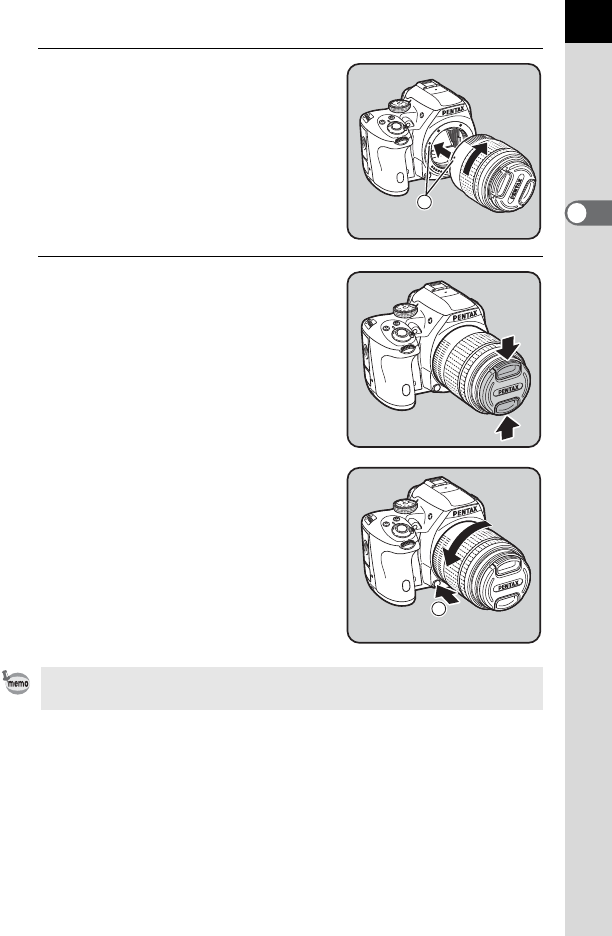
Align the lens mount index (red
dots: 3) on the camera and the
lens, and secure by turning the
lens clockwise until it clicks.
After attaching, turn the lens
counterclockwise to make sure that the
lens is locked in place.
4
Remove the front lens cap by
pushing the indicated portions
inward.
To remove the lens
Attach the lens cap first, and then turn the
lens counterclockwise while holding
down the lens unlock button (4).
The body mount cover (1) is for preventing scratches and blocking dust when
shipped. Body Mount Cap K that has a lock on the body is sold separately.
3
4