
User's Manual


Table Of Contents
- For Using Your Camera Safely
- Care to be Taken During Handling
- Contents
- Composition of the Operating Manual
- 1 Before Using Your Camera
- 2 Getting Started
- 3 Basic Operations
- 4 Shooting Functions
- 5 Shooting Settings
- 6 Playback Functions and Image Editing
- 7 Changing Additional Settings
- 8 Connecting to a Computer
- 9 Using the Flash
- 10 Appendix
101
Shooting Functions
4
Focusing
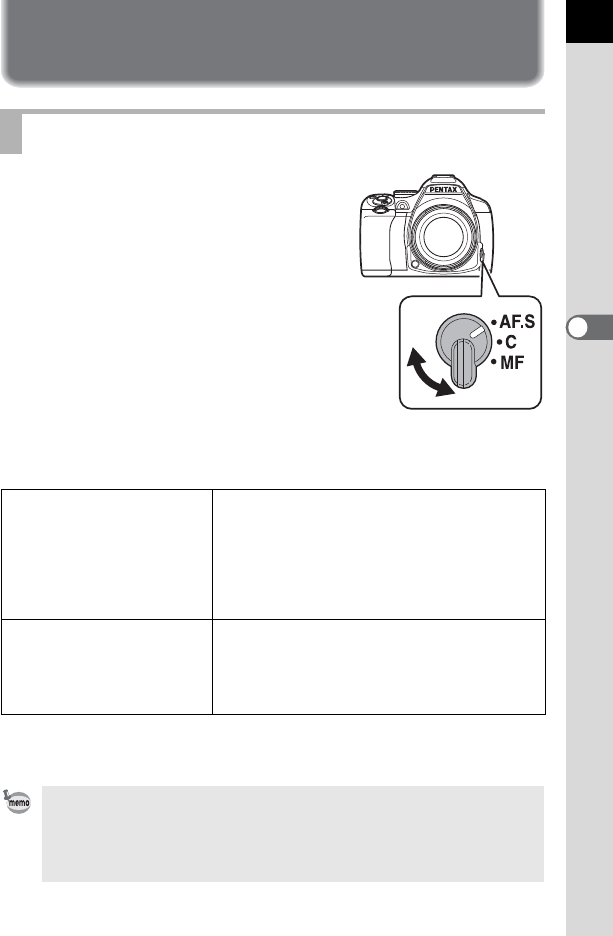
Set the focus mode switch to l, A, or \.
The autofocus methods for shooting with the viewfinder differ from those
for shooting with Live View.
Refer to “Adjusting the Focus Manually (Manual Focus)” (p.110) for details
on \ mode.
Setting the Focus Mode
Shooting with the viewfinder
TTL phase-matching autofocus:
Select from l, k, or f mode which
enables automatically switching between l
and k. (p.102) Set the focusing point in [AF
Active Area]. (p.104)
Faster autofocus performance than “contrast
detection AF” is possible.
Shooting with Live View
Contrast detection AF:
Face detection and tracking are available.
(p.106)
The camera behaves the same whether the
focus mode switch is set to l or A.
If [Enable AF1] or [Enable AF2] is assigned to the =/L button, you can
set the camera so that pressing the=/L button focuses automatically, in
the same way as pressing the shutter release button halfway. By default, both
pressing the shutter release button halfway and using the =/L button
can perform autofocus. (p.169)