
User's Manual


Table Of Contents
- For Using Your Camera Safely
- Care to be Taken During Handling
- Contents
- Composition of the Operating Manual
- 1 Before Using Your Camera
- 2 Getting Started
- 3 Basic Operations
- 4 Shooting Functions
- 5 Shooting Settings
- 6 Playback Functions and Image Editing
- 7 Changing Additional Settings
- 8 Connecting to a Computer
- 9 Using the Flash
- 10 Appendix
202
Playback Functions and Image Editing
6
Connecting the Camera to an AV
Device
You can connect the camera to a TV or other device and play back
captured images.
You can connect the camera to a device with a video input terminal.
Use the optional AV cable I-AVC7.
1
Turn the AV device and camera off.
2
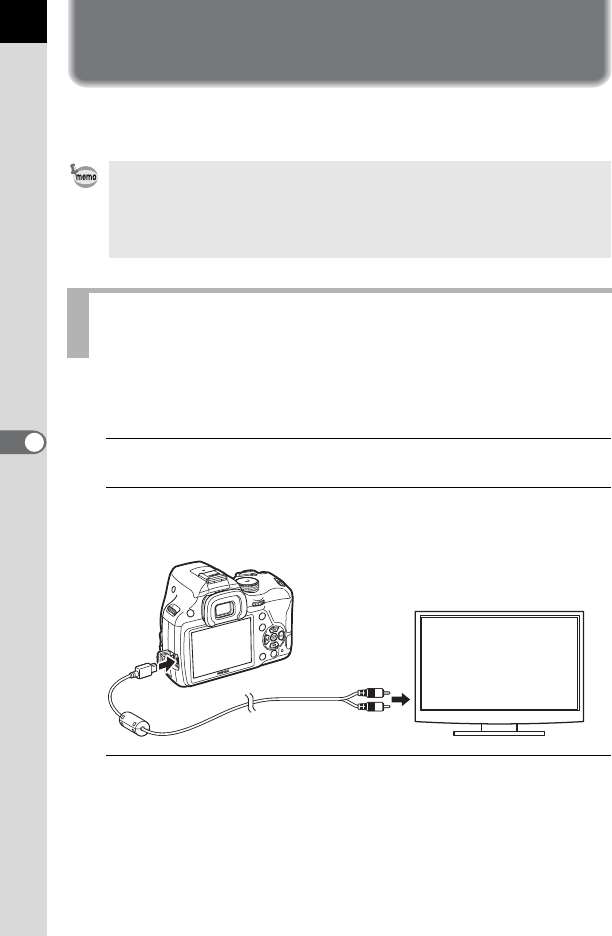
Open the terminal cover of the camera, and connect the
AV cable to the VIDEO/PC output terminal.
3
Connect the other end of the cable to the input terminal on
the AV device.
• For an AV device with multiple video input terminals, check the operating
manual of the device, and select a suitable video input terminal for
connecting the camera.
• If you intend to use the camera continuously for a long period, use of the
optional AC adapter kit is recommended.
Connecting the Camera to a Video Input
Terminal