
Q7 Digital Camera Manual


Table Of Contents
- Checking the Contents of the Package
- How to Use This Manual
- Contents
- Introducing the PENTAX Q7
- Getting Started
- Taking Pictures
- Playback Functions
- Changing the Settings
- Appendix
2
Getting Started
26
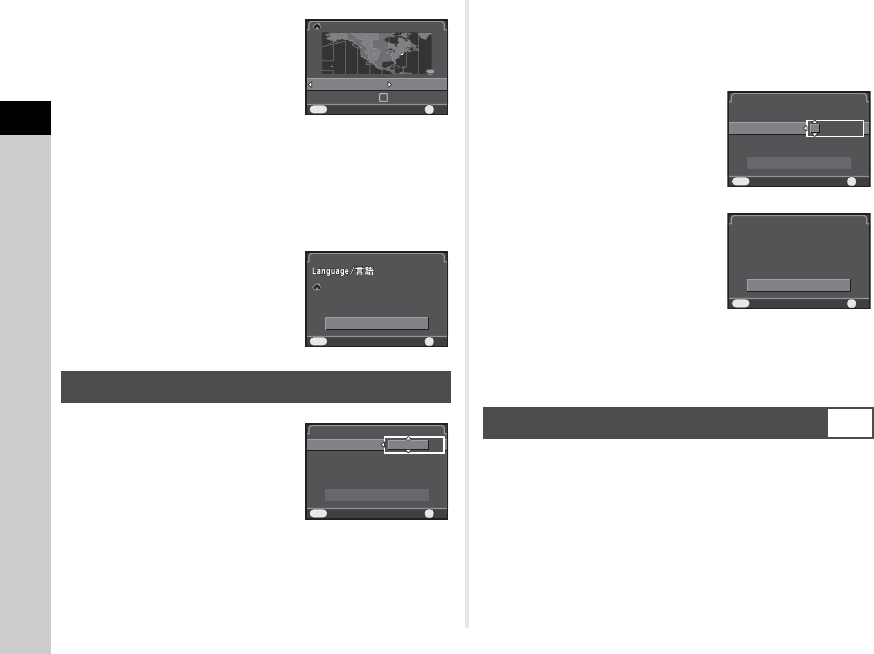
3 Use CD to select a city.
Use V to change the region.
Refer to “List of World Time
Cities” (p.82) for cities that can be
selected as a hometown.
4 Press B to select [DST] (daylight saving time),
and use CD to select S or T.
5 Press E.
The camera returns to the [Initial Setting] screen.
6 Press B to select
[Settings complete] and
press E.
The [Date Adjustment] screen
appears.
1 Press D, and use AB to
select the date format.
2 Press D, and use AB to select 24h or 12h.
3 Press E.
The frame returns to [Date Format].
4 Press B, and then press D.
The frame moves to the month if the date format is set to
[mm/dd/yy].
5 Use AB to set the month.
Set the day, year and time in the
same manner.
6 Press B to select
[Settings complete] and
press E.
The camera switches to capture
mode and is ready to take a
picture.
tMemo
• You can change the language and date and time settings
from the D1 menu. (p.18)
1 Press F.
The A1 menu appears.
2 Use V to display D4 menu.
3 Use AB to select [Format] and press D.
The [Format] screen appears.
Setting the Date and Time
Hometo wnHometown
New YorkNew York
DSTDST
CancelCancel OKOK
OK
MENU
Initia l Sett ing
Initial Setting
Settin gs com plete
Settings complete
Cancel
Cancel
MENU
Englis h
English
New York
New York
OK
OK
OK
Date F ormat
Date Format
Date Adjus tment
Date Adjustment
Date
Date
01/01/2013
01/01/2013
Time
Time
00:00
00:00
Settin gs com plete
Settings complete
mm /d d/ y y
mm/dd/yy
24h
24h
Cancel
Cancel
OK
OK
OK
MENU
Formatting a Memory Card
D4
Date F ormatDate Format
Date Adjus tmentDate Adjustment
DateDate
01/01/201301/01/2013
TimeTime
00:0000:00
Settin gs com pleteSettings complete
mm /d d/ y ymm/dd/yy
24h24h
CancelCancel OKOK
OK
MENU
Date F ormat
Date Format
Date Adjus tment
Date Adjustment
Date
Date
05/05/2013
05/05/2013
Time
Time
10:00
10:00
Settin gs com plete
Settings complete
mm /d d/ y y
mm/dd/yy
24h
24h
Cancel
Cancel
OK
OK
OK
MENU