
Q7 Digital Camera Manual


Table Of Contents
- Checking the Contents of the Package
- How to Use This Manual
- Contents
- Introducing the PENTAX Q7
- Getting Started
- Taking Pictures
- Playback Functions
- Changing the Settings
- Appendix
1
Introduction
14
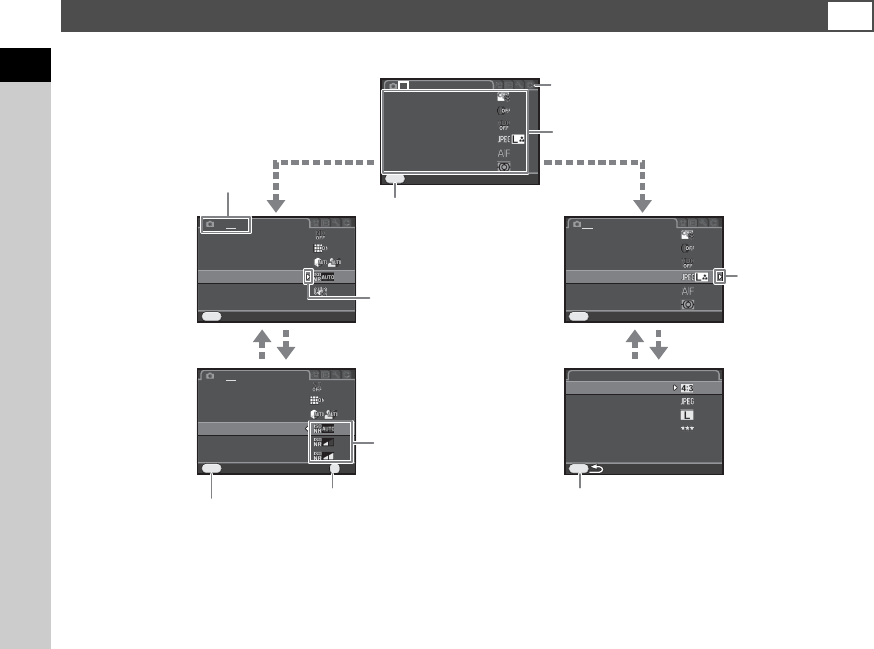
Most functions are set from the menus. Functions that can be set on the control panel can also be set from the menus.
tMemo
• In capture mode, the A1 menu is always displayed first when F is pressed. To display the menu tab selected the last time first,
set in [15. Save Menu Location] of the E3 menu.
• Settings are returned to their default values with [Reset] of the D3 menu (excluding some functions).
Using the Menus
F
Aspect RatioAspect Ratio
File Fo rmatFile Format
Image C apture SettingsImage Capture Settings
MENU
JPEG Re corded PixelsJPEG Recorded Pixels
JPEG Qu alityJPEG Quality
Custom ImageCustom Image
Digital FilterDigital Filter
Image C apture SettingsImage Capture Settings
AF/MF S ettingsAF/MF Settings
AE Mete ringAE Metering
ExitExit
MENU
1 23
HDR Cap tureHDR Capture
Distort ion Cor rectionDistortion Correction
ExitExit
MENU
1 2 3
ND Filt erND Filter
High-IS O NRHigh-ISO NR
Shake R eductio nShake Reduction
Input F ocal Le ngthInput Focal Length
50mm50mm
D-Range Settin gsD-Range Settings
Custom ImageCustom Image
Digital FilterDigital Filter
Image C apture SettingsImage Capture Settings
AF/MF S ettingsAF/MF Settings
AE Mete ringAE Metering
ExitExit
MENU
1 23
HDR Cap tureHDR Capture
Distort ion Cor rectionDistortion Correction
CancelCancel
MENU
1 2 3
ND Filt erND Filter
High-IS O NRHigh-ISO NR
Shake R eductio nShake Reduction
Input F ocal Le ngthInput Focal Length
D-Range Settin gsD-Range Settings
OKOK
OK
Use AB to select an item.
Use V to switch the menu tabs.
Press F to exit the menu
screen.
Menu numbers
Press D to display the
pop-up menu.
Press D to display
the submenu.
Press E to confirm the selected item.
Press F to cancel the pop-up menu.
Press F to return to the previous screen.
Use AB to select an item.