
Computer Accessories User Manual

EQUITY 386SX
1
Switch Settings
1
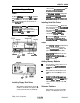
Serial Port Connector
CPU SPEED
Mck
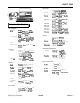
There are no DIP switches on the Equity
388!X
However, there is a CPU SPEED switch on the front of
the unit in the lower left hand corner.
1
CDC
I
DalaeanlardMwt
2
SIN
I
Raoeta
dam
3
sour
0
flalwmltdnm
4
DTR
0
Dammmlkmifasdy
5
&
s-ground
6
maeetmdy
7
RTS
b
Requeettosalnl
6 CT9
I
aarlosald
9
RI
I
Rhlg
Indhmr
The CPU SPEED
switoh
selects between BMHz and
16MHt.
When the computer is running at
8MH2,
the
power light is orange, and at 16MHz, the light is green.
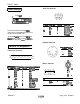
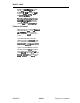
Keyboard Connector
Connector Pin Assignments
1
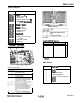
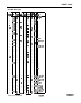
Parallel Port Connector
13
0000000000000
25
000000000000
fWNUL(BER 8lGNUNAME
DfREcTloN
DEscR1PlloN
1
-
STROBE
0
Prhtw
SIrcbe
2
DATA0
3
DATA1
:
m&O
Data 1
4
DATA2
Data 2
5
DATA3
:
Data3
6
DATA4
0
Dal64
7
DATA5
0
Dam
5
5
DATA6
9
DATA7
:
Dams
Dam
7
10
-ACU
I
Printer
acknav(edge
11
BUSY
I
Prklm
bu3y
12
PE
I
P~fltaf
paper
empty
13
SLCT
Pfhter select
14
AUTOFD
b
AUlOhdXT
15
-
ERROR
I
Prhtw
error
16
-
INIT
I
Printer
lnitlaiize
17
-
SLCTIN
I
Prhtersaleclin
18-25
SG
FG
slgnd
gmund
FG
Frame around
PIN
NUMBER
8lGNAl
1
aook
2
Dam
3
N.C.
4
GmlSld
5
+s
VDC
GlUU”d
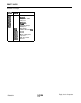
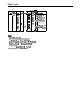
Mouse Connector
6ACK
PANEL
1
Sk
0
2
Ym
3
0
4
PIN
NUMBER SIGNAL NAME
DIRECTION
DESCRIPTION
1
MSCLK
0
Mouse cbck
2
MSGND
Mouse
siglal
!pufKl
3
MSDATA
I
Mouse
data
4
MSVCC
Mouse
pcwer
(+5
VDC)
EQ386SX-2
Equity Series Computers