User's Manual
Manuals
Brands
Pelco Manuals
DVR
Pelco Digital Video Recorder C2631M-A
51
52
53
54
55
56
57
58
59
60
54
Client Application
C2631M-A (6/07)
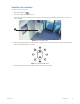
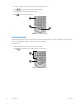
ADJUSTING THE CAMERA LENS
T
o adjust camera
lens features
:
•
Click the plus
(+) or minus (-
) button next
to the zoom,
focus, and iri
s function o
n the keypad.
Figure 32.
PTZ Keypad with Camera Lens Controls
1
...
...
52
53
54
55
56
...
...
248