
User Manual

Peavey Xport
™
User Guide
Read First!
Important Safety Considerations
1. Read all operating instructions.
2. In case of damage due to spilled liquids or physical damage from knocks or dropping, repairs should be performed by qualified service
personnel only.
3. Do not allow children to use Peavey Xport
™
without adult supervision.
4. Operating temperature 10 ~ 50°C.
Package Content
• 1 x Xport
™
Computer Guitar Interface
• 1 x CD with drivers, software and user guide.
• 1 x 5ft. USB cable
Please read and follow the instructions on the Registration Card, which entitles you to technical support and service-under-
warranty.
1. Quick Start
To begin using your Xport
™
, follow these simple instructions.
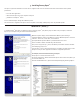
1. Insert the driver and software CD into your computer’s CD drive. From the CD, run either Peavey_Xport
™
_USB_Driver_Setup.exe on
Windows or Peavey_Xport
™
_Driver.dmg on the Mac.
2. Connect the supplied USB cable to your computer’s USB port; connect the other end to the Xport
™
.
3. Connect one end of your guitar cable to your guitar and the other end to the Xport
™
guitar input, located at the bottom of the unit.
4. Connect a pair of headphones or speakers (not included) to the 1/8” phones jack, located at the bottom of the unit.
5. Run your guitar processing software or DAW, and select Peavey Xport
™
as the I/O device.
6. Rock the house.
Peavey Xport
™
is compatible with Windows XP / Vista / 7 through ASIO
™
and WinMM (playback only). It is compatible with Mac OS X through
CoreAudio
™
.
In order to get full functionality from your Xport
™
, it is important that you install the provided driver. While connecting the Xport
™
to your
computer’s USB bus will install default USB audio drivers, these will not allow you to achieve optimal usage, as tested and certified using the
provided driver.
CAUTION
RISK OF ELECTRIC SHOCK
DO NOT OPEN