
User`s manual

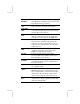


Plug and Play
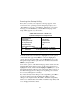
Aware O/S
Enable this item if you are using an O/S that
supports Plug and Play such as Windows
95/98/ME.
Primary Graphics
Adapter
This item indicates if the primary graphics
adapter uses the PCI or the AGP bus. The
default PCI setting still lets the onboard
display work and allows the use of a second
display card installed in a PCI slot.
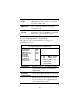
Allocate IRQ to
PCI VGA
If this item is enabled, an IRQ will be
assigned to the PCI VGA graphics system.
You set this value to No to free up an IRQ.
PCI IDE BusMaster
This item enables or disables the DMA under
DOS mode. We recommend you to leave this
item at the default value.
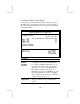
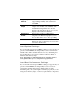
Load Optimal Settings
If you select this item and press Enter a dialog box appears. If you
press Y, and then Enter, the Setup Utility loads a set of fail-safe
default values. These default values are not very demanding and
they should allow your system to function with most kinds of
hardware and memory chips.
Note: It is highly recommended that users enter this option to
load optimal values for accessing the best performance.
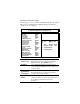
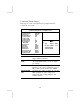
Load Best Performance Settings
If you select this item and press Enter a dialog box appears. If you
press Y, and then Enter, the Setup Utility loads a set of best-
performance default values. These default values are quite
demanding and your system might not function properly if you are
using slower memory chips or other low-performance components.
25