
User`s manual
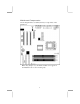
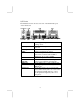
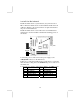
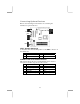
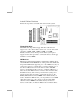

USB2: Front panel USB Connector
The mainboard has USB ports installed on the rear edge I/O port
array. Additionally, some computer cases have USB ports at the
front of the case. If you have this kind of case, use auxiliary USB
connector USB2 to connect the front-mounted ports to the
mainboard.
Pin Signal Pin Signal
1 VERG_FP_USBPWR0 2 VERG_FP_USBPWR0
3 USB_FP_P0- 4 USB_FP_P1-
5 USB_FP_P0+ 6 USB_FP_P1+
7 GROUND 8 GROUND
9 KEY 10 USB_FP_OC0
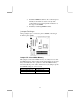
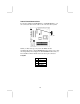
1. Locate the USB2 connector on the mainboard.
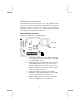
2. Plug the bracket cable onto the USB2 connector.
3. Remove a slot cover from one of the expansion slots on the
system chassis. Install an extension bracket in the opening.
Secure the extension bracket to the chassis with a screw.
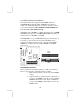
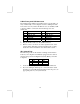
IR1: Infrared Port
The infrared port allows the wireless exchange of information
between your computer and similarly equipped devices such as
printers, laptops, Personal Digital Assistants (PDAs), and other
computers.
Pin Signal Pin Signal
1 NC 2 KEY
3 +5V 4 GND
5 IRTX 6 IRRX
1. Locate the infrared port IR1 connector on the mainboard.
2. If you are adding an infrared port, connect the ribbon cable
from the port to the IR1 header and then secure the port to an
appropriate place in your system chassis.
14