
User`s manual
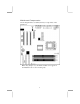
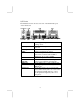
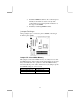
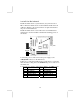
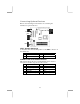
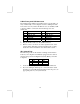

I/O Ports
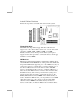
The illustration below shows a side view of the built-in I/O ports
on the mainboard.
PS/2 Mouse
Use the upper PS/2 port to connect a PS/2
pointing device.
PS/2 Keyboard
Use the lower PS/2 port to connect a PS/2
keyboard.
Parallel port
(PRN)
Use the PRN to connect printers or other
parallel communications devices.
COM1
Use the COM port to connect serial devices
such as mice or fax/modems. COM1 is
identified by the system as COM1.
VGA
Use the VGA port to connect VGA devices.
LAN Port
(optional)
Connect an RJ-45 jack to the LAN port to
connect your computer to the Network.
USB Ports
Use the USB ports to connect USB devices.
Game Port
Use the game port to connect a joystick or a
MIDI device.
Audio Ports
Use the three audio ports to connect audio
devices. The left side jack is for a stereo line-
out signal. The middle jack is for a stereo
line-in signal. The right side jack is for a
microphone.
Microphone
PRN
COM1
V
G
A
Game
Line-Out Line-In
USB
LAN
PS/2 KBD
PS/2 Mouse
8