
User`s guide


Motherboard User’s Guide
44
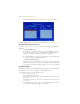
b Select “NVIDIA RAID CLASS DRIVER (required)” and then press Enter.
c Press S again at the Specify Devices screen, then press Enter.
d Select “NVIDIA NForce Storage Controller (required)” and then press
Enter.
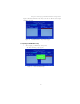
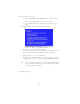
The following Windows Setup screen appears listing both drivers:.
Figure 1.13 Windows Setup—NVIDIA drives listed
Press Enter to continue with Windows Installation.
Be sure to leave the disk storage inserted in the disk drive until the blue screen
portion of Windows installation is completed, then take out the floppy.
Follow the instructions on how to install Windows.
After Windows is completely installed, it is recommended that you install the
ForceWare software in order to access the MediaShield RAID Management tool.
Note:
Each time you add a new hard drive to a RAID array, the RAID driver will
have to be installed under Windows once for that hard drive. After that, the
driver will not have to be installed.
5
6
This concludes chapter 5.