
User`s guide




25
Chapter 3: BIOS Setup Utility
Integrated Peripherals Page
This page sets up some parameters for peripheral devices connected to the system.
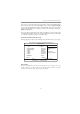
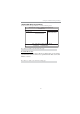
CMOS Setup Utility - Copyright (C) 1985-2005, American Megatrends, Inc.
Integrated Peripherals
Onboard IDE Controller Enabled
Help Item
F10: Save ESC: Exit+/-/: Value
Enter : Select
F9: Optimized Defaults
F1:General Help
: Move
mnlkmnlk
mnlkmnlk
mnlk
Serial-ATA 0 Enabled
SATA Mode Select SATA Mode
nVidia RAID Setup Press Enter
Onboard AUDIO Function Auto
Onboard LAN Function Auto
Onboard LAN Boot ROM Disabled
Serial Port1 Address 3F8/IRQ4
Legacy USB Support Enabled
USB Controller Enabled
f
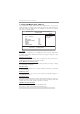
DISABLED: disables the inte-
grated IDE Controller.
PRIMARY: enables only the Pri-
mary IDE Controller.
SECONDARY: enables only the
Secondary IDE Controller.
BOTH: enables both IDE Con-
trollers.
SATA Mode select (SATA Mode)
Use this item to select the mode of the Serial ATA.
OnBoard IDE Controller (Enabled)
Use this item to enable or disable the onboard IDE interface.
Serial-ATA 0 (Enabled)
This item allows you to enable or disable the onboard SATA controller.
nVidia RAID Setup (Press Enter)
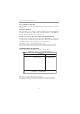
Scroll to this item and press <Enter> to view the following screen:
X
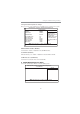
CMOS Setup Utility - Copyright (C) 1985-2005, American Megatrends, Inc.
nVidia RAID Setup
RAID Setup
Help Item
F10: Save ESC: Exit+/-/: Value
Enter : Select
F9: Optimized Defaults
F1:General Help
: Move
mnlkmnlk
mnlkmnlk
mnlk